Time-Consuming
Manually typing invoice and packing-slip data takes time that warehouse and purchasing teams could spend on receiving, checking and moving inventory.
From supplier documents to inventory, faster.
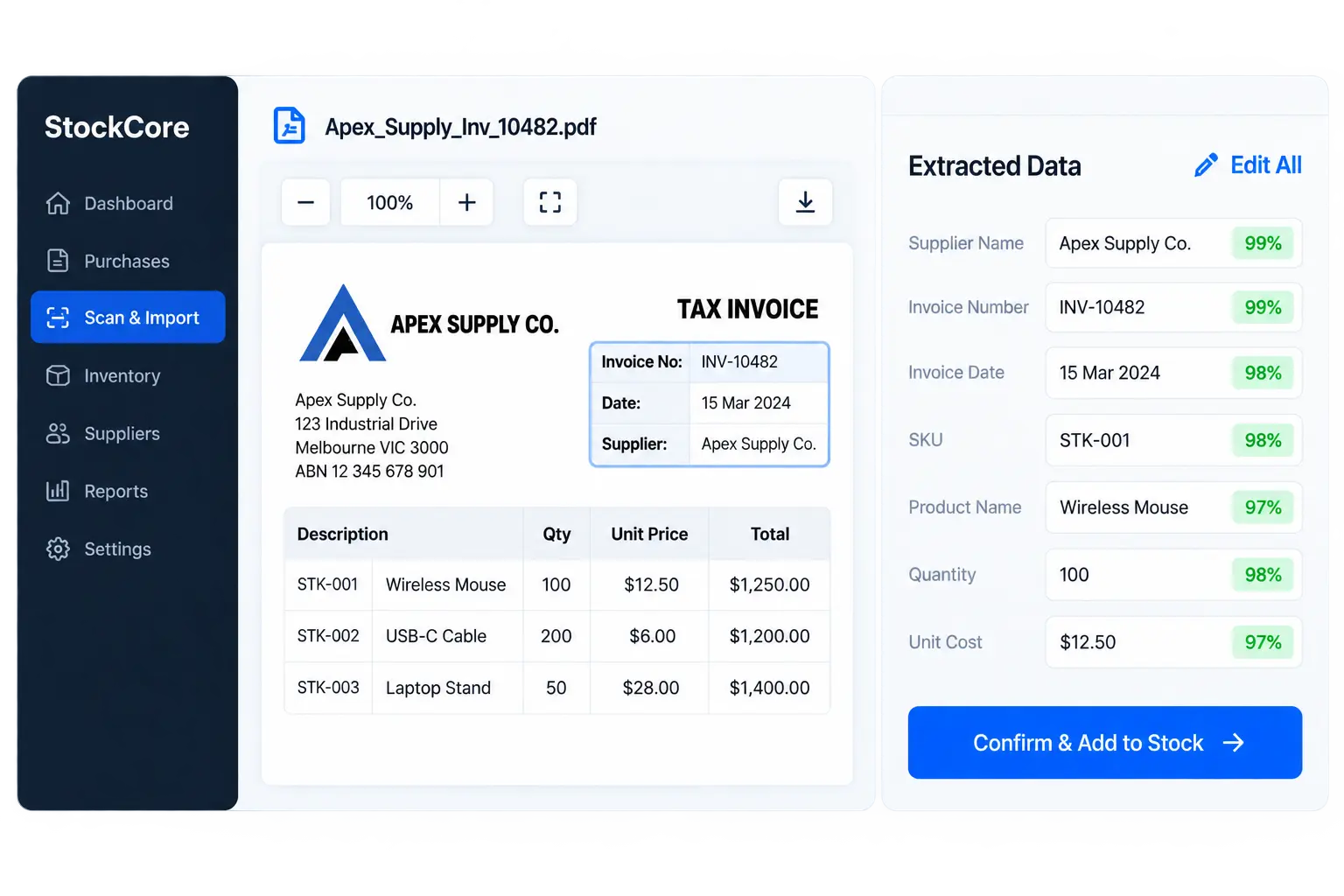
Upload or scan supplier invoices and inventory documents, let StockCore extract the important information, review the results, and confirm them directly into stock — without repetitive manual entry.
Less manual work. More inventory control.
PDF, Images, Scans
Drag & drop or upload
Auto-extracted
98% confidence
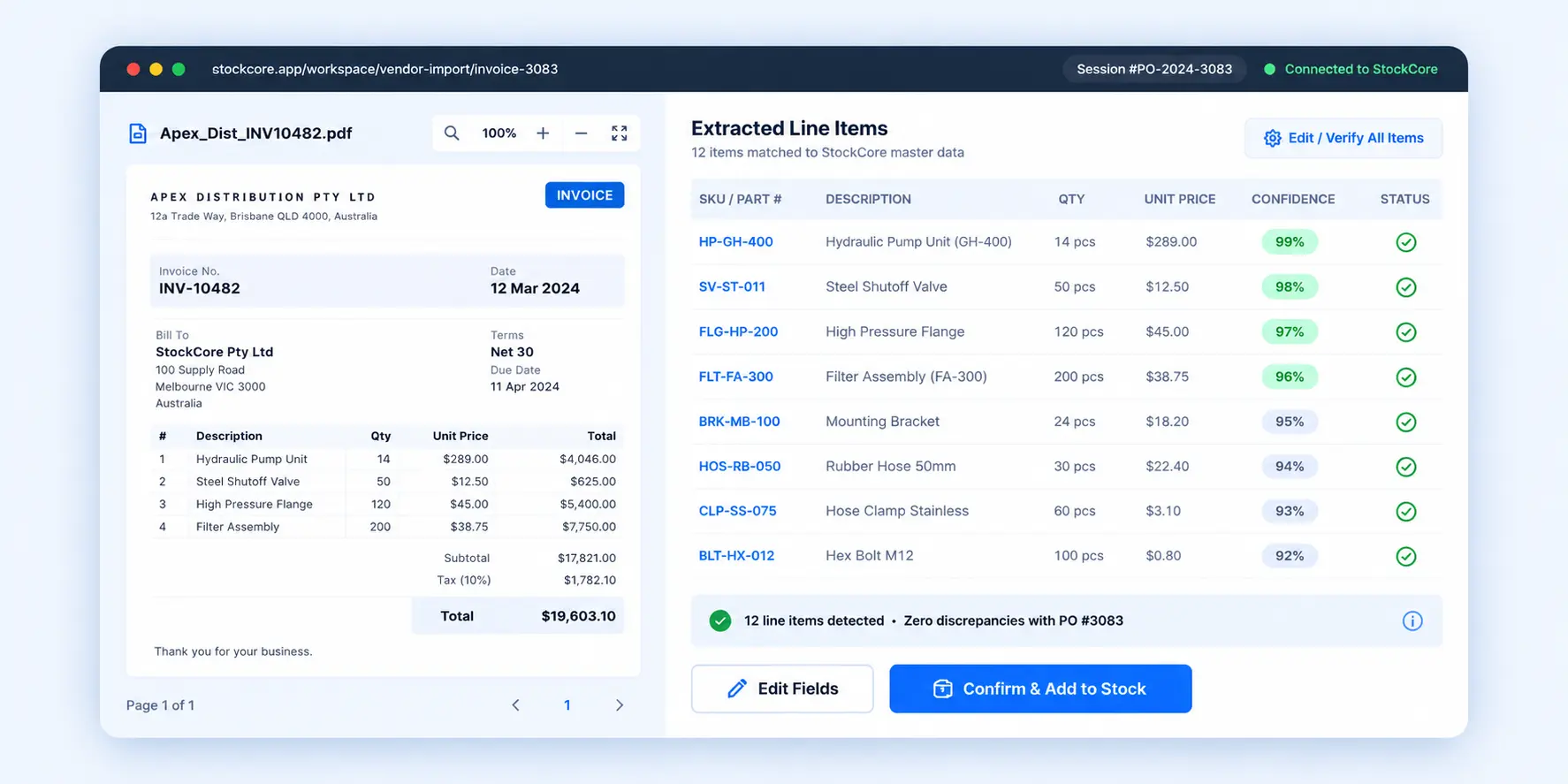
12 line items detected
Ready for your review
Ready for Inventory
Add to stock with one click
The Manual Entry Problem
Purchase orders, supplier invoices, packing slips and other inventory documents often arrive in different formats. Manually re-entering the same information is slow, repetitive and more likely to introduce errors into your inventory records.
Manually typing invoice and packing-slip data takes time that warehouse and purchasing teams could spend on receiving, checking and moving inventory.
Typos, missed line items and incorrect quantities can lead to inaccurate stock levels, pricing issues and avoidable reconciliation work later.
The same supplier and product information is often entered more than once across receiving logs, spreadsheets, purchasing records and inventory systems.
Physical stock may already be sitting in the warehouse while the system still shows outdated quantities because receiving data has not yet been entered.
Slower receiving
Manual entry delays stock updates.
More corrections
Re-keying increases error risk.
Repeated admin work
The same data gets entered twice.
Less real-time visibility
Inventory data falls behind reality.
How It Works
A simple review-first workflow designed to reduce repetitive entry while keeping your team in control before anything is confirmed into stock.
Upload supplier invoices, packing slips or other inventory documents from your device, or capture a document using a supported scanning workflow.
Documents ready
Upload or capture
StockCore identifies relevant information such as supplier details, SKUs, line items, quantities and costs and turns the document into structured inventory data.
Structured data
Ready for review
Compare the extracted information with the original document, edit anything that needs attention and approve the final data before inventory is changed.
Human review
Edit before confirming
Once everything looks right, confirm the document and use the reviewed information to create or update the relevant inventory records.
Add to inventory
Reviewed and ready
A streamlined receiving workflow that moves supplier documents from intake to reviewed inventory data. Select a step below to explore the process.
Bring supplier documents into StockCore without retyping them manually. Upload files from the warehouse, desktop or another supported intake source and prepare them for extraction.
Invoice_Apex_3802.pdf
2.4 MB • Supplier document
Supported Inputs
Example supported inputs — confirm final operational file specifications with the development team before launch.
Import digital supplier invoices and related documents directly into the scan/import workflow.
Bring in invoice scans captured from office scanners or other image-based document sources.
Upload document photos and image files from desktop, tablet or other supported devices.
Capture supplier paperwork using a phone camera as part of the receiving or document intake process.
Route supplier documents into the intake workflow from email when supported by the final implementation.
Use receiving paperwork to help capture product references, quantities and other shipment details.
Interactive Workspace
Review source documents side-by-side with extracted inventory data, verify line items, make corrections where needed, and confirm the final information before it enters stock.
Why Teams Use It
Reduce repetitive receiving admin so warehouse and inventory teams can move goods through the business with more speed, accuracy and control.
Turn supplier invoices and inventory documents into structured stock records without retyping every SKU, quantity and cost line by line.
Reduce admin-heavy receiving work.
Reduce mistakes in SKUs, quantities, supplier references and unit costs by reviewing extracted information before it becomes part of your inventory records.
Cleaner stock data with fewer corrections.
Move from delivery paperwork to updated inventory sooner, helping receiving teams make newly arrived stock visible without waiting on lengthy re-entry.
Move received stock into the system sooner.
Keep human control by reviewing extracted document data and making any necessary corrections before information is written into stock.
Nothing is committed until it is reviewed.
Workflow Comparison
Illustrative workflow example — actual processing time depends on document complexity, number of line items and receiving workflow.
Unpack supplier documents from cartons, emails or incoming PDF attachments.
Search for each SKU or product inside the inventory system and confirm the correct matching item.
Re-enter quantities, supplier references, unit costs and product details line by line.
Manually verify quantities and individual unit prices against the supplier paperwork.
Recalculate totals and check that the invoice matches the values entered into the system.
Save the received stock and repeat any required information in other operational records.
More repetitive typing creates more opportunities for transcription mistakes and slower stock visibility.
Upload the supplier document or capture it directly as part of the receiving process.
StockCore converts supplier and line-item information into structured fields ready for review.
Review extracted values side-by-side with the original document and correct anything that needs attention.
Confirm the reviewed information and use it to create or update the appropriate inventory records.
Less repetitive entry while keeping human review before inventory is updated.
Times shown above are illustrative examples only. Actual processing time will vary depending on document quality, number of items and receiving complexity.
Measurable Operational Impact
Reduce receiving bottlenecks, minimise repetitive data entry and keep inventory information moving through the warehouse with greater speed and consistency.
Faster
Move from supplier paperwork to reviewed inventory data with fewer manual steps, helping receiving teams process arriving goods sooner.
Reduced Errors
Reduce transposed part numbers, missed line items and incorrect quantities by validating extracted data against the original supplier document before confirmation.
Connected
Compare supplier documents with existing purchase records so receiving teams can identify expected items, quantities and references more easily.
Audit-Ready
Keep the original supplier document alongside reviewed inventory information so teams can trace where received data came from and review changes later.
Specific processing-time, accuracy and document-retention figures can be added once the final StockCore implementation and compliance requirements are confirmed.
Join warehouse, wholesale and distribution teams using StockCore to turn supplier documents into cleaner inventory data with less repetitive manual entry.